
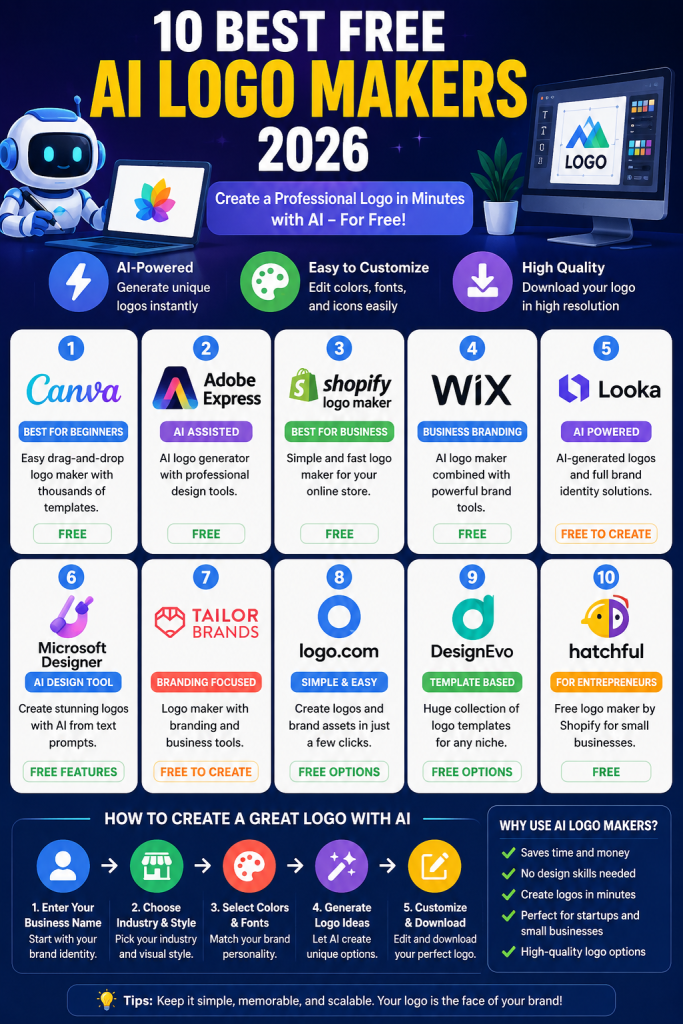
The best free AI logo makers 2026 make it easier than ever to create a professional-looking logo without hiring a designer. With just a business name, industry, style, or simple description, you can generate logo ideas in minutes.
A logo is one of the most important parts of a brand identity. It appears on websites, social media profiles, business cards, product packaging, advertisements, and many other places.
The good news is that you don’t always need expensive design software to get started. Many online logo makers provide free tools, templates, AI-powered features, or free design options for beginners.
In this guide, we’ll compare the best free AI logo makers 2026, including their main features, strengths, limitations, and the types of users they are best suited for.
If you’re also interested in creating AI images, check out our guide to 12 Best Free AI Image Generators in 2026.
Quick Comparison
| AI Logo Maker | Best For | Free Access |
|---|---|---|
| Canva | Beginners and social media | Yes |
| Adobe Express | AI logo generation | Yes |
| Shopify Logo Maker | Small businesses | Yes |
| Wix Logo Maker | Business branding | Yes |
| Looka | AI-powered branding | Free to create |
| Microsoft Designer | AI design experiments | Free features |
| Tailor Brands | Business branding | Free creation |
| Logo.com | Simple logo creation | Free options |
| DesignEvo | Logo templates | Free options |
| Hatchful | Small businesses | Free |
Best Free AI Logo Makers 2026
1. Canva
Canva is one of the easiest options for beginners who want to create a logo without advanced graphic design skills.
The platform provides a drag-and-drop editor, professional templates, icons, fonts, colors, and other design elements. Canva also includes AI-powered creative features.
Canva’s official logo maker allows users to create logo designs online and customize them before downloading or sharing them.
Best for: Beginners, online stores, social media creators, and small businesses.
Pros:
- Easy drag-and-drop editor
- Large template library
- Many design elements
- Beginner-friendly
- Useful for social media branding
Cons:
- Some elements require a paid plan
- Advanced features may be limited on free accounts
Best free AI logo makers 2026 should be easy to use, and Canva is particularly useful if you also need social media graphics after creating your logo.
2. Adobe Express
Adobe Express is another strong option for creating logos online.
Its logo maker allows users to enter a brand or business name, choose an industry and style, and generate logo ideas. Adobe also provides an AI logo generator that can create designs from text prompts.
Best for: Users who want AI-assisted logo generation and editing.
Pros:
- AI logo generation
- Professional templates
- Easy online editor
- Free options available
- PNG downloads available
Cons:
- Some advanced features require a paid plan
- Some assets may be premium
If you want more control after generating a logo, Adobe Express is a practical choice because you can continue editing the design instead of simply accepting the first AI result.
3. Shopify Logo Maker
Shopify Logo Maker is designed for entrepreneurs and small businesses.
One of its biggest advantages is simplicity. You provide your brand name and choose from available design options, then customize the result.
Shopify currently describes its Logo Maker as a completely free tool and says logos created with it are yours to use.
Best for: Online stores, entrepreneurs, and small businesses.
Pros:
- Free
- Simple interface
- Business-focused templates
- Easy customization
- Useful for new brands
Cons:
- Fewer advanced design controls than professional software
- AI generation is not the main focus
For someone launching a new online shop, Shopify Logo Maker can be a very convenient starting point.
4. Wix Logo Maker
Wix Logo Maker combines logo creation with broader business branding tools.
The platform can use information about your business and preferred style to suggest logo designs. You can then customize elements such as fonts, colors, icons, and layouts.
Best for: Businesses that also want a website and complete brand identity.
Pros:
- Business-focused
- AI-assisted logo creation
- Customizable colors and fonts
- Useful brand tools
Cons:
- Some high-quality downloads require payment
- Some plans have additional features
Wix is particularly useful when your logo is part of a larger website-building project.
5. Looka
Looka uses AI-powered technology to generate logo concepts based on information such as your company name, preferred styles, colors, and symbols.
The platform can generate many design ideas and allows users to refine the results.
Best for: Entrepreneurs who want many AI-generated design concepts.
Pros:
- AI-powered logo creation
- Many design variations
- Brand-focused workflow
- Easy customization
Cons:
- Some downloads require payment
- Free creation does not necessarily mean every final asset is free
Looka is worth trying if you want to explore multiple branding directions before deciding on a final logo.
6. Microsoft Designer
Microsoft Designer is an AI-powered design tool that can help users create visual content from text descriptions.
It can be useful for experimenting with logo concepts, social media graphics, promotional images, and other brand materials.
Best for: Users already familiar with Microsoft’s ecosystem.
Pros:
- AI-assisted design
- Text-based creative workflow
- Useful for branding experiments
- Simple interface
Cons:
- Exact features can depend on the current plan
- Dedicated logo controls may be less specialized than logo-focused platforms
If you want one AI design platform for multiple types of content, Microsoft Designer can be worth exploring.
7. Tailor Brands
Tailor Brands focuses on helping businesses build a complete visual identity rather than simply generating a single logo.
The platform can be useful for entrepreneurs who want their logo to work across multiple branding materials.
Best for: Startups and small businesses.
Pros:
- Business-oriented
- Branding tools
- Multiple logo concepts
- Useful for entrepreneurs
Cons:
- Some downloads and branding features require payment
- Free creation and free commercial downloads are not necessarily the same thing
Always check the current licensing and pricing information before using a generated logo commercially.
8. Logo.com
Logo.com provides tools for creating logos and other brand assets.
It is designed for users who want a relatively straightforward way to develop a visual identity without learning complicated design software.
Best for: Beginners and small businesses.
Pros:
- Simple workflow
- Logo templates
- Branding features
- Easy customization
Cons:
- Some assets may require payment
- Advanced branding features can vary by plan
Logo.com can be useful when you want to create a logo and continue developing other brand materials.
9. DesignEvo
DesignEvo is a logo creation platform focused heavily on templates and customization.
Instead of relying entirely on AI generation, users can start with an existing logo concept and modify fonts, icons, colors, and other elements.
Best for: Beginners who prefer templates.
Pros:
- Large selection of templates
- Simple editing
- Many categories
- Easy to experiment with different designs
Cons:
- Some downloads may have restrictions
- Less AI-focused than newer AI logo generators
DesignEvo is a good alternative if you prefer controlling the design yourself rather than relying entirely on AI.
10. Hatchful
Hatchful was created by Shopify as a logo and branding tool for entrepreneurs.
It was designed to make logo creation easier for people who don’t have professional design experience. Shopify has described Hatchful as a tool that provides pre-designed logo options based on business information and allows customization.
Best for: Entrepreneurs and small businesses looking for simple logo concepts.
Pros:
- Beginner-friendly
- Business-focused
- Simple customization
- Designed for entrepreneurs
Cons:
- Feature availability can change
- Some newer Shopify branding tools may be more relevant today
Which AI Logo Maker Should You Choose?
The best tool depends on what you need.
If you’re a complete beginner, Canva is one of the easiest choices.
If you want AI-generated logo concepts, Adobe Express and Looka are worth trying.
For an online business or store, Shopify Logo Maker is a practical option.
If you want to combine a website with branding, Wix is worth considering.
For users who prefer templates and manual customization, DesignEvo can be useful.
The best free AI logo makers 2026 are not necessarily the ones with the most features. The right choice is the platform that gives you enough customization, suitable licensing, and a design that actually fits your brand.
When comparing the best free AI logo makers 2026, look at customization options, download quality, licensing, and ease of use.
How to Create a Good Logo With AI
Using an AI logo generator is easy, but the quality of the final result depends heavily on your instructions.
1. Start with your business name
Enter the exact name you want customers to see.
2. Describe your industry
Tell the AI whether your business is related to technology, fashion, food, education, finance, beauty, or another industry.
3. Choose a visual style
Examples include:
- Minimalist
- Modern
- Luxury
- Professional
- Playful
- Futuristic
- Vintage
4. Choose your colors
Colors should match your brand personality.
For example, blue can communicate professionalism, while bright colors may work better for playful brands.
5. Keep the design simple
A good logo should remain recognizable even when displayed at a small size.
Avoid adding too many icons, colors, or words.
6. Check the logo at different sizes
Before using your logo, check how it looks as:
- Website header
- Instagram profile picture
- YouTube channel icon
- Business card
- Product label
- Mobile profile image
AI Logo Maker vs Professional Designer
AI logo generators are excellent for getting started quickly.
They can provide ideas in minutes and are particularly useful for individuals and small businesses with limited budgets.
However, a professional designer can provide more personalized branding and a deeper understanding of typography, visual identity, brand positioning, and originality.
A practical approach is to use AI to generate initial concepts and then refine the best concept manually.
Are Free AI Logo Makers Really Free?
This is an important question.
A tool may allow you to create a logo for free, but downloading high-resolution files, vector files, brand kits, or commercial assets may require payment.
Therefore, always check:
- Download restrictions
- File formats
- Commercial-use rights
- Trademark limitations
- Premium icons or fonts
- Watermarks
- Current pricing
Never assume that every AI-generated logo is automatically available for every commercial purpose.
The best free AI logo makers 2026 can help you create professional concepts without a large design budget.
Final Verdict
The best free AI logo makers 2026 give entrepreneurs and creators an affordable way to experiment with professional branding.
Canva is excellent for beginners, Adobe Express is useful for AI-assisted creation, Shopify is practical for online businesses, Wix is useful for broader branding, and Looka is worth exploring for AI-generated concepts.
Before choosing a platform, create several variations and compare them. The best logo isn’t necessarily the most complicated one. A simple, memorable design that represents your brand clearly is usually a better starting point.
For beginners, the best free AI logo makers 2026 are a practical way to start building a visual identity.
For beginners and small businesses, the best free AI logo makers 2026 offer a simple way to create professional branding without expensive design software.
FAQ
What is the best free AI logo maker in 2026?
Canva, Adobe Express, Shopify Logo Maker, Wix Logo Maker, and Looka are among the options worth considering. The best choice depends on whether you prioritize templates, AI generation, customization, or business branding.
Can I create a logo for free with AI?
Yes. Several platforms allow you to create logo concepts for free. However, some may charge for high-resolution downloads, premium assets, or commercial branding packages.
Can I use an AI-generated logo for my business?
It depends on the platform’s current terms and the assets used in the design. Always check the commercial-use and licensing conditions before using a logo commercially.
Is Canva good for making logos?
Yes. Canva is designed to be beginner-friendly and provides templates, editing tools, and design elements that can be used to create logos.
What is the easiest AI logo maker for beginners?
Canva and Adobe Express are good starting points because they provide relatively simple interfaces and allow users to customize designs without advanced graphic design skills.

